Tattoo Lettering Fonts: How to Choose a Style for Your Words
Compare script, serif, sans-serif and blackletter tattoo fonts. Test your own words, check readability and prepare a clear reference for your tattoo artist.
Quick answer
Compare a few lettering styles using your exact words. Check spelling, letter shapes and spacing, then save a clear reference to discuss with your artist. An online preview is not a professional transfer stencil or a guarantee of the finished result.
A tattoo lettering font should help your words communicate the feeling you want. A flowing script, a crisp serif and a plain sans-serif can make the same phrase look very different. Start with the exact wording, compare a few directions, and prepare a reference your tattoo artist can discuss with you.
An online font preview is a starting point. It does not determine the final size, placement or lettering your artist will use on skin.
Choose the words before choosing the font
Type the full name, date or phrase you intend to use. A font that looks appealing in a single initial may feel crowded in a longer quotation. Compare the actual capital letters, repeated characters and punctuation in your wording.
For a date, keep the original date beside any written-out or Roman numeral version. For a quotation, decide which wording and punctuation you mean to keep before comparing decorative styles. Changing the phrase later can change the whole composition.
Compare four lettering directions
Script: connected and expressive

Great Vibes: an actual browser-generated lettering preview on a simulated background, not a photograph of a finished tattoo.
Script can suggest handwriting, formal calligraphy or a more relaxed personal note. Look at how letters join and whether long loops distract from the words. A capital letter with a large flourish may need a different balance from the rest of the phrase.
Try the phrase with both a restrained script and a more decorative option. Ask someone to read each preview without telling them what it says. Any hesitation is useful information to bring to your artist; it is not a diagnosis of how a tattoo will age.
Serif: structured and editorial

Cinzel: the same phrase in a serif direction, exported from the lettering tool.
Serif letters have small finishing strokes. Some feel literary and quiet; others use pronounced thick-and-thin contrast for a more formal look. Compare an entire word rather than choosing from a particularly attractive first letter.
Pay attention to letters that could be confused in your phrase. Uppercase I, lowercase l and the number 1 can look similar in some designs. Check a date and a name separately even when you plan to use the same typeface for both.
Sans-serif: direct and understated
Sans-serif lettering removes those finishing strokes. It can make a short word or a line of numbers feel simple and deliberate. That simplicity also makes spacing and alignment noticeable.
Compare regular and heavier-looking options where available. Do not assume that something described as minimalist must use the thinnest possible strokes. The preview helps you communicate a visual direction; your artist should advise on the final execution.
Blackletter: a strong visual character
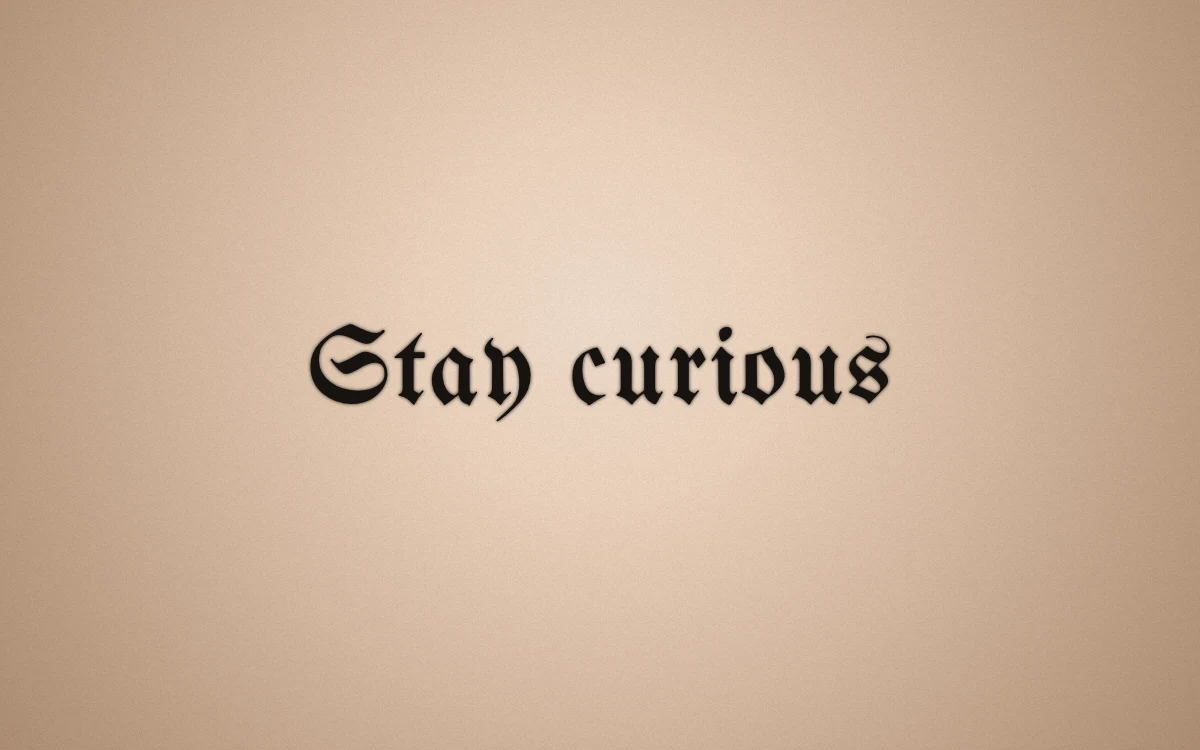
Unifraktur Maguntia: a blackletter comparison generated in the browser.
Blackletter uses distinctive angular forms and dense shapes. It can work as a bold lettering direction, but its unfamiliar characters may take longer to read. Check every letter in your own word rather than assuming it resembles a familiar printed alphabet.
If the visual atmosphere appeals to you but the phrase becomes difficult to recognize, compare a less ornate alternative. Readability and decoration are choices to discuss, not a competition for the most elaborate font.
Use a short comparison instead of saving dozens of options
Choose three candidates with meaningfully different styles. Keep the wording identical in each preview so you can compare the lettering itself.
For each candidate, note:
- Which letters are easiest to recognize?
- Does the style fit the meaning of the phrase?
- Do flourishes compete with a name, date or second line?
- What would you want your artist to redraw or adjust?
You can explore your words in the TattooDoodle lettering studio. Use the preview to narrow the direction, then discuss the design with your artist. If you also need ideas for an accompanying motif, browse the tattoo ideas guide.
Proofread the reference separately
Before exporting anything, check names, dates, punctuation and capitalization against a trusted original. Read the phrase once for meaning and again one character at a time. Ask another person to check it independently.
For another language or writing system, ask a qualified speaker to review the wording and exact characters. A font preview does not verify a translation, spelling or cultural meaning.
Make a clear reference for your artist
Once you have a preferred direction, use Make a reference card to prepare a shareable design reference, or Download PNG to save the lettering preview. Keep a plain-text copy of the wording with it so decorative letters cannot hide a proofreading mistake.
The file is a communication reference. It does not set an exact physical size or replace the professional stencil your artist prepares. The tattoo templates guide explains the distinction between a design reference and a transfer stencil.
Bring the reference, the verified wording and your alternatives to the consultation. Ask your artist about the placement, size, spacing and any custom lettering they recommend. A clear reference gives that conversation a useful starting point.
Make your own
Explore a tattoo concept with the AI generator (free usage is limited), preview lettering with the free font tool, or try a placement preview. AI design references are not professional tattoo-ready stencils.