Transparent Tattoo PNG: Check the File Before Sharing
Check a transparent tattoo PNG on light and dark backgrounds. Export genuine lettering, preserve exact wording and send a clear reference to your artist.
Quick answer
Export your exact wording, reopen the transparent PNG on contrasting backgrounds, and keep a readable preview. A PNG reference is not a professional transfer stencil.
A transparent PNG can keep the background out of a lettering reference, but it still needs a readability check. Export the design, open the actual file on a light and a dark background, and keep a separate readable preview for your artist. Transparency describes how pixels are displayed; it does not turn a digital design into a professional transfer stencil.
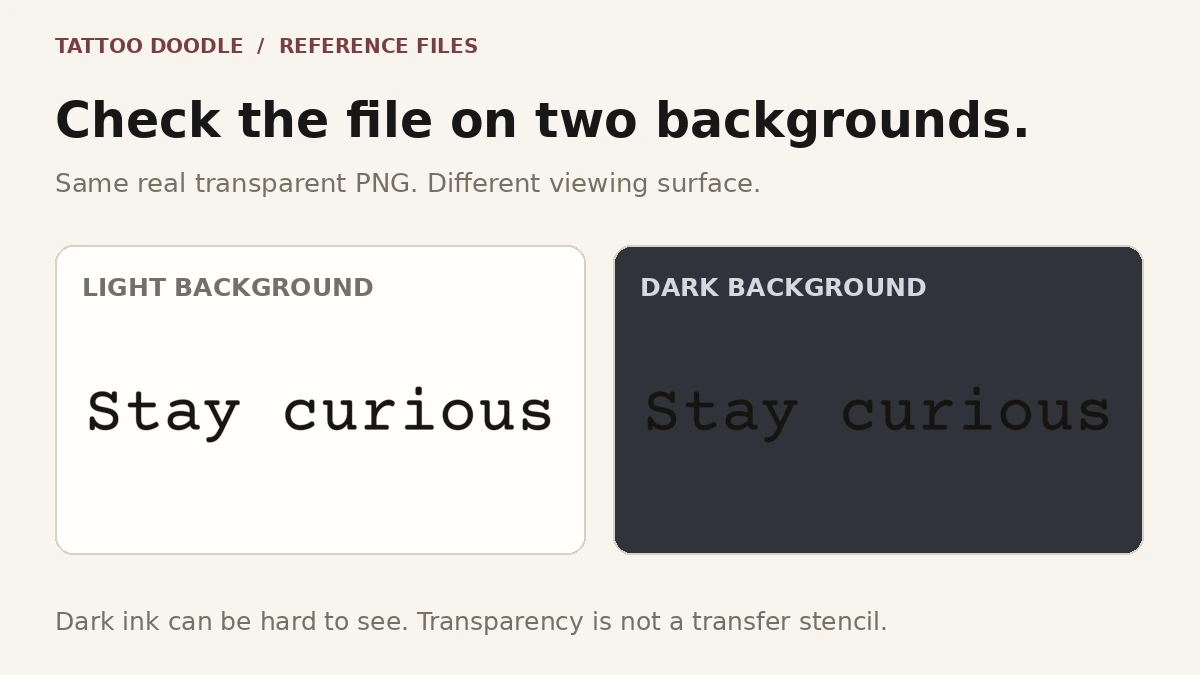
One genuine Courier Prime export from the lettering studio, displayed on two backgrounds. These are digital reference examples, not completed tattoos.
Decide what the file needs to communicate
Choose transparency when the background would get in the way of a design discussion or a separate placement mockup. For a simple consultation, an ordinary preview with a visible background may be easier to read. You can send both, with clear names, instead of making the recipient work out whether an apparently empty image contains dark lettering.
The PNG specification supports transparency through image data such as an alpha channel. A file ending in .png is not automatically transparent, though: PNG can also contain an entirely opaque background. The extension alone does not tell you which version you saved.
Export the actual words, then inspect the download
In the lettering studio, type and proofread your complete wording before exporting. Keep the font and settings fixed while comparing files. The Transparent PNG button exports the lettering without the preview background; Download PNG provides the regular preview rendering. Those are two versions of a reference, not two different tattoo designs.
For this original example, we typed “Stay curious,” selected Courier Prime and downloaded both versions. The transparent file contains transparent background pixels and visible lettering pixels; the regular preview has an opaque background. The figure uses the same transparent download on both panels, without recoloring its lettering. The downloaded file, rather than a screenshot of the web page, is the item to inspect and share.
Open the export again after saving it. Check spelling, capitalization, punctuation and the ends of the line. If something is missing or clipped, return to the original wording and make a new export. The letter-spacing guide explains why you should change one setting at a time rather than changing wording, font and spacing together.
A dark viewer can hide dark lettering
An image viewer may display transparent areas against a dark surface. Dark lettering can then be difficult to distinguish, even though the file is not blank. In our example, the phrase is readable on the light panel and much less obvious on the dark one. That observation concerns this digital file and its viewing background, not how a tattoo would look on skin.
Do not use the surface behind an image in one application as proof that the file is empty or opaque. Reopen the actual file against a contrasting background. Also check whether a sharing service sent the original file or a screenshot or recompressed preview. If you are unsure what your artist received, ask which attachment they can open before repeatedly exporting new versions.
Keep an editable wording master separately
A PNG is a raster image. The letters in a saved PNG are pixels, rather than an editable line of text in a document. Keep the exact phrase in a separate plain-text note, including any intended punctuation or line breaks. Changing the note will not update a previously exported image.
If your reference contains a year or date, verify the underlying value before styling it. The Roman numeral guide separates checking a number from choosing a font. A polished export cannot correct an incorrect date or spelling on its own.
Send context, not a physical-size instruction
Use simple file names such as stay-curious-transparent.png and stay-curious-preview.png. Add a note identifying which is the preferred wording, which is a visual alternative and what question you want the artist to assess. Avoid putting private details into a publicly shared file name.
A useful handoff might say: “This is the exact wording. The transparent image is a digital reference; the second image shows the lettering on a light background. Please advise on the final drawing and placement.” That is a sample message, not a statement that an artist has reviewed this design.
Ask the studio which file format it wants. A transparent PNG, a reference card and a professional transfer stencil have different roles. Neither a pixel count nor a browser size setting proves an appropriate physical tattoo size, finished result or healing outcome. Use the exported reference to make the discussion clearer, then let the artist assess the final work.
Make your own
Explore a tattoo concept with the AI generator (free usage is limited), preview lettering with the free font tool, or try a placement preview. AI design references are not professional tattoo-ready stencils.