Tattoo Lettering Punctuation: A Final Proofreading Pass
Proofread apostrophes, quotation marks, dashes and dates in tattoo lettering. Keep the intended text separate from decorative styling.
Quick answer
Check every punctuation mark against verified plain text, then inspect the exported image. Decide whether a mark belongs to the wording before adjusting its visual position.
A lettering preview can contain every expected letter and still be wrong. Apostrophes, quotation marks and separators are easy to overlook because they occupy little visual space. Give them a separate proofreading pass instead of relying on a general impression of the phrase.
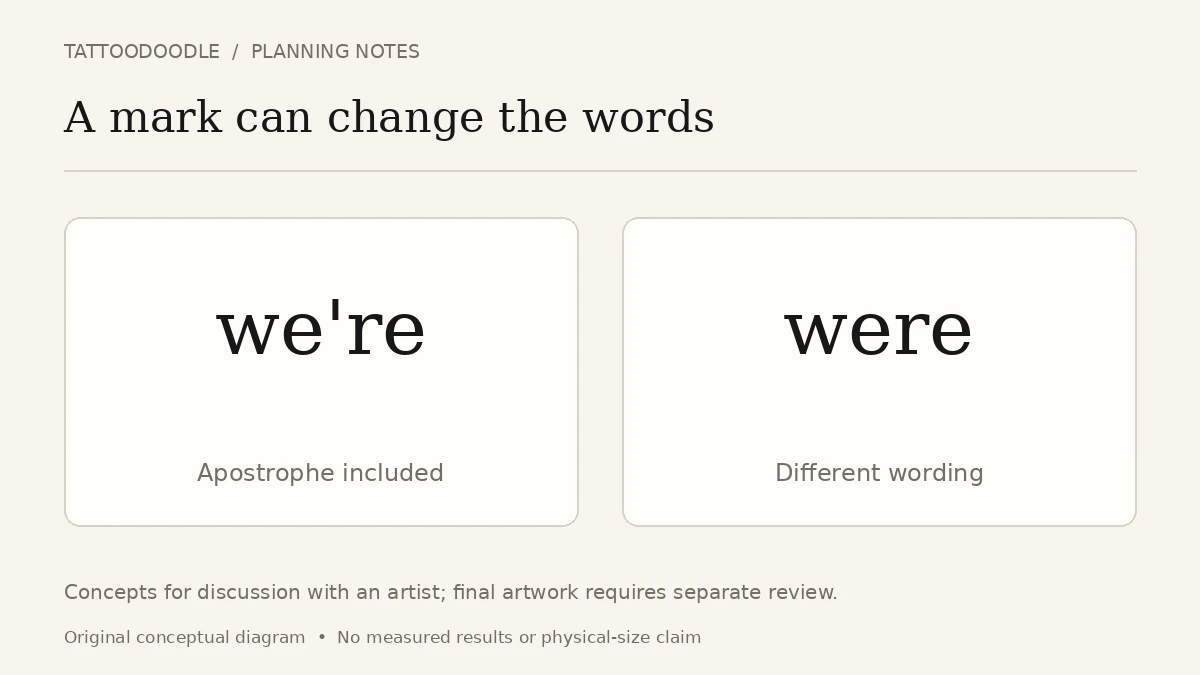
Original planning diagram; not a physical-size proof or completed tattoo.
Resolve meaning before appearance
Consider the original example “we're” and “were.” The apostrophe changes the text. Decide which wording you mean before choosing the prettier shape. The same principle applies to a possessive name, an abbreviation or punctuation within a quoted sentence.
For a quotation, check a reliable original source and record the intended excerpt. Do not assume punctuation found in a social image is accurate. If you deliberately change the wording, keep a note that distinguishes your adaptation from the source.
Inspect each kind of mark
Check whether quotation marks are opening and closing as intended. Look for an accidental extra mark introduced by copying text. Review hyphens and dashes individually: they are different characters, and an application may render them differently.
For dates or coordinates, verify the underlying information separately from the lettering. A clean separator does not prove that a date format or location is correct. Write the intended interpretation in ordinary words beside the design when there is room for ambiguity.
Do a punctuation-only read
First read only the letters against your master text. Then make a second pass looking only for marks and spaces. Finally read the phrase normally. This small change in attention can reveal a missing apostrophe that you stopped noticing after many font comparisons.
Open the downloaded image and repeat the check there. The saved file is what you may actually send to the artist, so it deserves its own inspection. A tiny phone thumbnail should not be the only copy used for approval.
Ask for a redraw without changing the text
If a mark feels visually detached, tell the artist what the intended character is and ask how to integrate it. Do not silently replace an apostrophe with a decorative dot or remove punctuation to make the layout easier.
Explore directions in the lettering studio, and use the lettering font guide to compare complete words. For a longer planning conversation, see the design guide. Keep the verified text with every revision so the final artwork can be checked without relying on memory.
Make your own
Explore a tattoo concept with the AI generator (free usage is limited), preview lettering with the free font tool, or try a placement preview. AI design references are not professional tattoo-ready stencils.