Tattoo Lettering with Accents: Check Every Character
Check accented letters, missing glyphs and font fallback before sharing a tattoo lettering reference with your artist.
Quick answer
Keep the verified spelling in plain text, compare every accented character in the preview, and check the exported image again. A font name alone does not confirm language coverage.
A name can look almost right while being spelled incorrectly. An accent, a dot or a different letter may carry meaning that a font preview cannot verify. Begin with the correct wording rather than choosing a decorative alphabet and trying to fit the name into it.
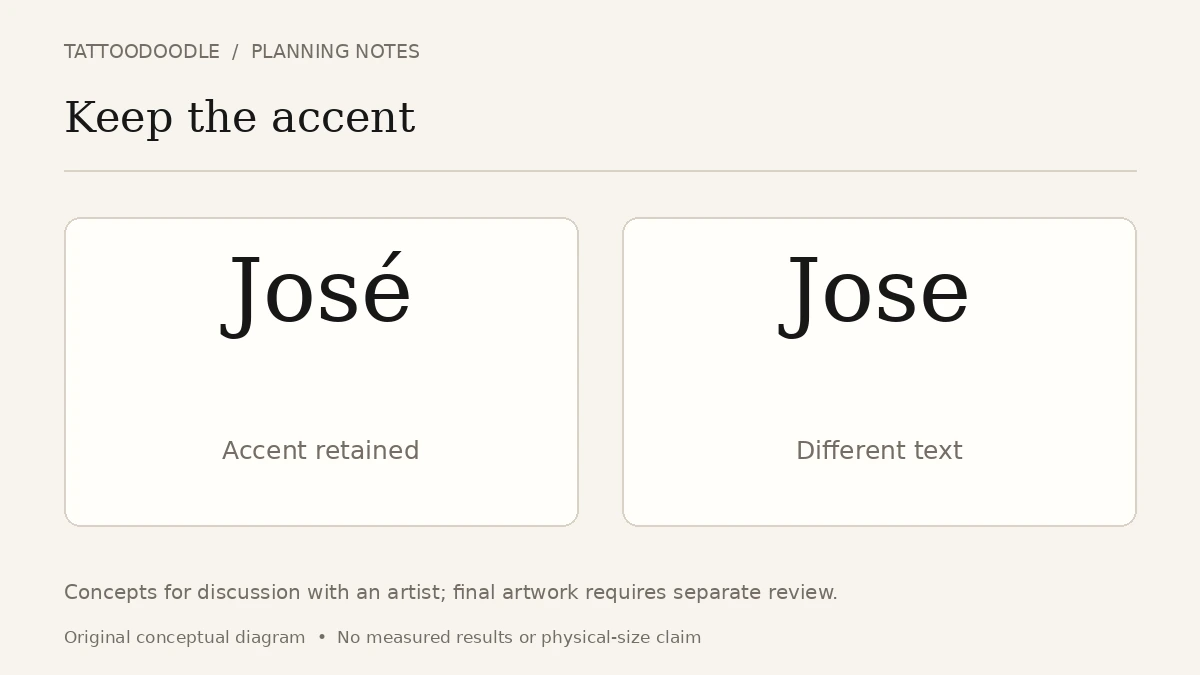
Original planning diagram; not a physical-size proof or completed tattoo.
Make a plain-text master
Copy the confirmed spelling into a separate note. Preserve the exact characters, capitalization and punctuation. For a name, ask the person whose name it is when appropriate. For unfamiliar language, use a qualified reader rather than treating a translation tool or attractive sample as proof.
Consider the illustrative pair José and Jose. These are different text strings. Removing the accent because one font renders it awkwardly changes the wording; it does not solve a design problem. Keep the intended text settled while you investigate the rendering.
Check for substitution as well as empty boxes
A missing character may appear as a box, but that is not the only possible symptom. A browser or application can display a character using another available font. The result may look readable while the accent, stroke style or proportions differ from the surrounding letters.
Compare the special character with the rest of the word. Does it have an unexpectedly different weight? Is the mark present and positioned clearly? If something seems inconsistent, try another font that contains the required characters or ask the artist to draw a complete lettering direction.
Inspect the saved file independently
Open the exported image outside the tool. Read it against the plain-text master character by character. Check the start and end of the word as carefully as the center. Do this before sending a small phone preview, where a mark may be hard to distinguish.
Do not repair a spelling issue by pasting a random accent image above the word and assuming the result is ready. A rough annotation can explain the issue, but the final artwork still needs coherent drawing and another wording check.
Give the artist a precise question
Send the verified text, the preview and a note identifying the character you want checked. For example: “Please retain the acute accent in José; the preview is only a lettering direction.” That is more useful than asking whether the whole image looks good.
Use the font selection guide to compare broader directions once the characters are correct. The lettering studio is a place to explore your wording, not a language verification service. Review the artist's revised artwork against the same master before confirming it.
Make your own
Explore a tattoo concept with the AI generator (free usage is limited), preview lettering with the free font tool, or try a placement preview. AI design references are not professional tattoo-ready stencils.