Tattoo Design Negative Space: Mark What Stays Open
Explain negative space in a tattoo design reference by identifying the gaps and open shapes you want to discuss with your artist.
Quick answer
Mark the open areas that matter to the composition, compare the silhouette with and without surrounding detail, and ask your artist how to resolve the final drawing.
Negative space is the area left open around or within the drawn shapes. In a tattoo reference, it can help explain why you like a composition even when you cannot name its style. Describing that space is more useful than simply asking for a design to feel less busy.
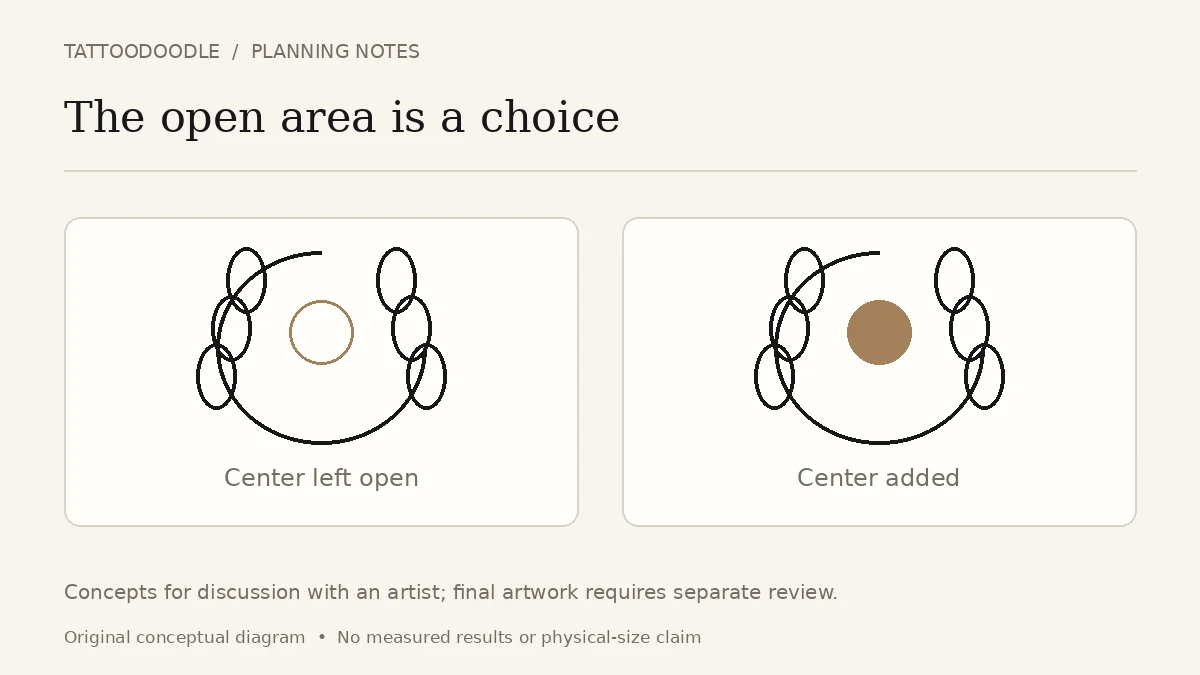
Original planning diagram; not a physical-size proof or completed tattoo.
Point to a particular gap
Identify the exact area you want to discuss: the center between two leaves, the margin around a symbol or the space separating a motif from lettering. Use an annotation on a duplicate of the reference so the untouched original remains available.
For a simple invented example, imagine two curved leaves framing an open center. Adding a small symbol to that center changes the focal point. Neither version is automatically better; the comparison helps identify whether the empty center was part of the attraction.
Read the outer shape first
Look at the design as a silhouette before inspecting small details. Can you describe its main shape in a few words? If the outline is unclear in the reference, adding more internal detail may not answer your underlying composition question.
Next, inspect the spaces between major elements. A surrounding ornament can draw attention away from the central subject or connect areas you wanted to keep distinct. Ask what that element contributes rather than keeping it only because there is room to add something.
Compare two controlled concepts
Create a rough version with the main subject only and another with the proposed supporting elements. Keep the subject and frame similar. Label both as concepts; this is a communication exercise, not a prediction of how a tattoo will look over time.
Avoid turning a screen gap into a physical specification. A certain number of pixels does not establish a suitable space on skin. Discuss the intended open shape with the artist and leave the final drawing and execution decisions to that professional conversation.
Include the area around the design
If the reference relates to existing artwork or a planned larger composition, explain that context. A cropped image can hide the reason a margin matters. Share only photographs you have permission to use, with unrelated identifying details removed where appropriate.
The black-and-white stencil guide offers broader contrast directions, while the design guide supports the overall brief. Use tattoo ideas to compare compositions, then tell the artist which open area you want preserved as an idea. Do not rely on the vague instruction “make it minimal” to communicate a specific spatial preference.
Make your own
Explore a tattoo concept with the AI generator (free usage is limited), preview lettering with the free font tool, or try a placement preview. AI design references are not professional tattoo-ready stencils.